Sydney Health
- 4.7
- Rating
- 1.00M
- Installs
- Free
- Price

 Analysis by App-foxy
Managing health insurance is rarely difficult because of one huge task. It is difficult because small tasks arrive at inconvenient moments: finding the right member information, checking what a plan offers, understanding where to start, or locating help when you are already worried about a medical issue. Sydney Health is designed to bring those insurance-related tasks into one mobile experience for Anthem, Wellpoint, and other health insurance plans. I found its strongest value in reducing the number of separate places I need to check.
This is a free medical app from Elevance Health, Inc., available to everyone by age rating. It has reached over a million installs and holds a 4.6 average from around eighty thousand ratings, with roughly six thousand seven hundred written reviews. Those figures suggest that it is not a niche companion for a small group of members; it is a widely used tool for people who want their health-plan information close at hand.
The app is currently at version 9.8.0 and requires iOS or Android 12 or later. I would describe it as a practical insurance companion rather than a replacement for a doctor, pharmacist, or urgent-care service. That distinction matters. Its usefulness depends on how well it helps me navigate my coverage and make the next administrative or care-related step, not on whether it can diagnose a condition.
You May Also Like

 Blood Strike: 2.5 Anniversary
Blood Strike’s Loadouts Turn Every Drop Into a Tactical Gamble
A close look at Blood Strike’s custom loadouts: how fast access to signature weapons reshapes its battle royale rhythm, rewards preparation, and narrows the gap between fights.

 Pandora - Music & Podcasts
Pandora’s Music Is Easy to Start, but Harder to Recover
Pandora’s strength is its low-effort path from a seed to a station. Its weak spot is how much confidence it asks you to place in connection, setup, and quiet recovery.

 8 Ball Pool
 Is Built on Rivalries, Rematches, and Routine
A close look at the rivalries, rematches, shared routines, and unanswered safety questions that turn a quick pool match into a persistent mobile community.

 Samsung Music
’s Quiet Strength Is Playing What You Already Own
Its reach comes less from spectacle than from dependable access to a personal library. That simplicity is both the app’s strongest retention engine and its ceiling.

 AccuWeather: Weather Radar
AccuWeather Review: A Quick, Clear Forecast for Everyday Decisions
For everyday plans, the best forecast is the one you can understand quickly. AccuWeather makes rain timing, radar, and local conditions easy to act on, with a few trade-offs.

 Hill Climb Racing
Why Hill Climb Racing Still Turns Crashes Into One More Run
A tiny car, a bumpy hill and one more upgrade: Hill Climb Racing keeps resurfacing because its simple chaos makes every near-miss feel personal.
More From Our News Desk



One capability makes the app worth keeping installed
The central capability I focused on is the way Sydney Health gathers health-plan access into a single mobile workflow. Instead of treating insurance as paperwork that only matters when a bill arrives, the app makes the plan something I can consult during an ordinary day. That shift is more important than it sounds because insurance questions often appear while I am away from home, preparing for an appointment, or trying to help a family member.
The real benefit is not simply having insurance information on a phone; it is shortening the path from a question to an action. If I need to understand where my plan fits into a care decision, I can begin in the app rather than searching through old messages, opening a browser, or calling a general number before I even know what to ask. The experience feels most useful when I already have a specific purpose in mind.
That purpose might be preparing for a visit, checking the practical side of using my coverage, or deciding whether I need to contact the plan directly. Sydney Health does not remove every piece of complexity, but it gives the process a more coherent starting point. For people who regularly forget where their member details are stored, that convenience can be more valuable than a long list of extra tools.
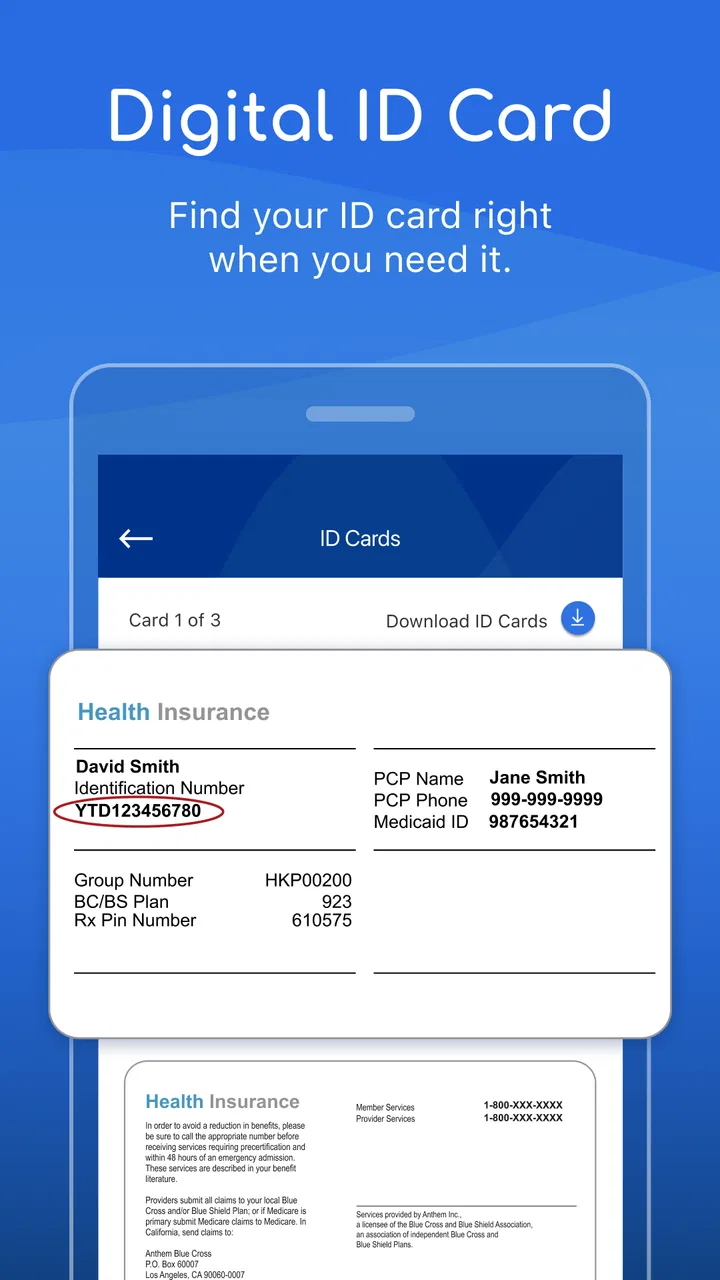
I also like that the app sits between two familiar alternatives. A paper insurance card is dependable but limited: it gives me important identifiers, yet it cannot guide me through a broader digital workflow. A normal web browser can reach a health-plan website, but the experience often feels less focused on the immediate needs of a phone user. Sydney Health is more convenient than both when I want a plan-centered task without sorting through unrelated browser tabs.
How the mobile workflow feels in everyday use
My advice is to open Sydney Health with a task already in mind. The app is easier to judge when I ask a concrete question such as, “What do I need before I deal with this appointment?” or “Where should I begin with my plan?” A vague browse can make any insurance app feel dense, while a defined goal turns the interface into a checklist of possible next steps.
The first practical hurdle is access. Because this is tied to health insurance, the app is not something I would expect to use as an anonymous medical reference. I need to treat sign-in and account setup as part of the process, not as an annoyance that the app should somehow avoid. I would complete that preparation before an appointment rather than waiting in a clinic lobby with a weak connection and limited patience.
Once I am inside, the most efficient habit is to pause before tapping through every available area. I look for the section that matches the immediate problem, then keep the relevant information visible while I make a decision. This sounds obvious, but it prevents a common mistake with insurance apps: collecting screens without understanding what action each screen supports.
A useful workflow is to use Sydney Health for orientation, then confirm anything important through the appropriate care or plan channel. For example, the app may help me understand where to begin, but a medical question still belongs with a qualified professional. Likewise, a coverage question that could affect a costly decision deserves careful confirmation rather than a quick assumption based on a general description.
That is one of the app’s less obvious strengths: it can make me better prepared for a conversation. Instead of contacting support with a broad complaint, I can first organize the issue and identify the exact point that remains unclear. The result is not necessarily fewer conversations, but more focused ones. In practice, that can save time and reduce the chance of explaining the same situation repeatedly.
There is also a trade-off in having so much plan-related material in one place. Consolidation is convenient, but it means the app can feel more administrative than personal. Someone expecting a simple wellness dashboard may find the experience less immediately engaging. I see Sydney Health as a tool I open because I need to accomplish something, not because I want to casually explore it every day.
The strongest scenario: preparing for care before leaving home
The best everyday scenario is a planned appointment that has enough moving parts to create uncertainty. Imagine that I have a visit coming up and want to avoid arriving without the information I may need. I open Sydney Health beforehand, review the plan-related details relevant to the visit, and note any question that still needs clarification. If I need to contact the insurer or the provider, I can do so with a clearer understanding of the issue.
This preparation changes the experience in a small but meaningful way. I am less likely to rely on memory, search through a drawer for an old card, or discover at the last moment that I do not understand a plan term. The app does not guarantee that every appointment will be smooth, but it helps move the administrative work to a calmer moment, when I have time to read and think.
A second strong scenario involves helping someone else. Family health administration is often scattered across messages, documents, and verbal reminders. Sydney Health can serve as the place I check first when I am trying to understand the plan side of a situation. I would still be careful about account access and personal information, but the mobile format is more practical than asking another person to locate a document while we are already dealing with a time-sensitive concern.
The app is also useful after an appointment, when a person may remember the medical discussion but forget the insurance-related follow-up. I can return to the plan information and use it to organize what happens next. This is where the app feels less like a digital card and more like an administrative anchor: it gives me a familiar place to restart the process.
My concrete tip is to use it before urgency appears. Install it, complete the initial access steps, and explore the areas connected to your plan while you are well. That preparation is more valuable than downloading it for the first time when a prescription, appointment, or billing question is already demanding attention.
Where the convenience stops
Sydney Health is not the right choice for everyone. If I do not have one of the supported Anthem, Wellpoint, or other participating health insurance plans, the app is unlikely to become useful simply because it is well reviewed. Its purpose is connected to plan membership, so people looking for a general medical encyclopedia, symptom checker, fitness tracker, or independent medication reference should choose a different kind of app.
I would also avoid treating it as an emergency tool. When a situation may be urgent, the correct response is to use appropriate emergency or professional medical services, not to spend time navigating an insurance interface. The app can help with the administrative side of care, but it is not a substitute for clinical judgment.
Another limitation is that insurance language can remain complicated even when the interface is convenient. A clean mobile screen does not automatically make every coverage rule easy to interpret. I still need to read carefully, especially when a decision involves a provider, a service, or a significant personal cost. The app can improve access to information without turning that information into a simple yes-or-no answer in every case.
There is a similar trade-off when comparing Sydney Health with a phone call. Calling may feel slower, but a representative can sometimes respond to a nuanced situation in a way that a structured app cannot. I prefer Sydney Health for preparation, routine access, and finding my starting point. I prefer direct human help when the issue depends on personal circumstances that are difficult to describe through standard screens.
Compared with using a browser, the app’s advantage is focus and repeatability. I do not have to remember which page I used last time or start from a general search. The disadvantage is that a dedicated app takes storage, requires maintenance, and depends on a compatible operating system. With a minimum requirement of Android or iOS 12, people using older devices may need to rely on another route to manage their plan.
Version 9.8.0 indicates that the app is an actively maintained product rather than an abandoned utility, but I would still keep expectations realistic. Updates can improve an experience while also changing where familiar information appears. If a future update alters the layout, I would give myself a few minutes to recheck the main sections instead of assuming that a missing item has disappeared.
Who gets the most from it
Sydney Health is best for people who already use their health insurance regularly and want a dependable mobile starting point. It is especially suitable for anyone who dislikes carrying paper details, manages several healthcare tasks, or wants to prepare questions before contacting a provider or insurer. The free price removes a common barrier, so trying it is reasonable when the plan is supported and the device meets the operating-system requirement.
It can also suit people who are comfortable doing basic research before asking for help. The app rewards a little organization: define the question, locate the relevant plan area, record what remains unclear, and then contact the right person if necessary. That workflow is more effective than opening the app without a goal and hoping it will explain the entire healthcare system.
People who want a broad, plan-independent health app should skip it. So should anyone expecting the app to replace a doctor, provide emergency guidance, or make complicated coverage decisions automatically. In those cases, a general medical reference, a provider’s own app, a pharmacy service, or direct professional support may be a better fit depending on the task.
Privacy and account awareness should also shape the decision. Health-plan apps can place sensitive information close to everyday phone activity, so I would use a device lock, avoid sharing account access casually, and sign out or protect the device when other people regularly handle it. These are sensible habits for any health-related service, but they matter especially when one app becomes the convenient place for plan administration.
My final view is favorable but deliberately practical. Sydney Health does not make healthcare simple, and it should not pretend to. What it does well is give members a more organized way to approach the insurance side of care, especially before an appointment or when a question needs a clear starting point. I recommend it to eligible members who want preparation and access, not to people searching for a general medical advice app.
For me, the deciding factor is whether the app reduces friction in a real routine. If I can check the plan side of a task before leaving home, arrive with better questions, and know when a human response is still needed, it has earned a place on my phone. That is a modest promise, but for health insurance administration, modest and dependable is exactly the kind of usefulness I value.
Sydney Health is free, rated for Everyone, and developed by Elevance Health, Inc. Its 4.6 average and broad adoption make it an appealing option to try for eligible members, while its limits are clear enough to plan around. I would install it before I need it, learn the sections that relate to my plan, and use it as a practical bridge between insurance information and the next real-world step.
FAQs for Sydney Health
01What is Sydney Health and what features does it offer?
Sydney Health is an app designed to help users manage their health and wellness efficiently. It offers features like personalized health insights, appointment scheduling, symptom checkers, and access to medical records. The app also provides 24/7 chat with a doctor, digital ID cards, and the ability to track fitness goals, making it a comprehensive health management tool.
02Is Sydney Health compatible with both Android and iOS devices?
Yes, Sydney Health is available for both Android and iOS devices. Users can download it from the Google Play Store for Android devices and the Apple App Store for iOS devices. The app is designed to provide a seamless experience across different platforms, ensuring that users can access their health information anytime, anywhere.
03Does Sydney Health offer any privacy protection for my medical data?
Sydney Health prioritizes user privacy and complies with HIPAA regulations to protect your medical data. The app uses advanced encryption to secure your information, ensuring that your health records and personal data are accessible only to you and authorized healthcare providers. Regular updates are made to maintain security protocols.
04Can I connect Sydney Health to other health devices or apps?
Yes, Sydney Health can be integrated with various health devices and apps to provide a more comprehensive overview of your health. This includes connecting with fitness trackers, smartwatches, and other health apps to sync data such as steps, heart rate, and more. This integration helps users track their health metrics in one place.
05Are there any costs associated with using Sydney Health?
Sydney Health is free to download and use. However, some features might require a subscription or additional fees, particularly if they involve third-party services or premium content. Users should check the app's terms and conditions for detailed information on any potential costs related to specific features or services.
Pros
- User-friendly interface for easy navigation.
- Comprehensive health tracking features.
- Personalized health insights and tips.
- Integration with health devices and apps.
- Efficient appointment scheduling options.
Cons
- Limited features in the free version.
- Occasional sync issues with devices.
- Advertisements in the free version.
- Requires a stable internet connection.
- Some features can be overwhelming.

Sydney Health
Gallery